
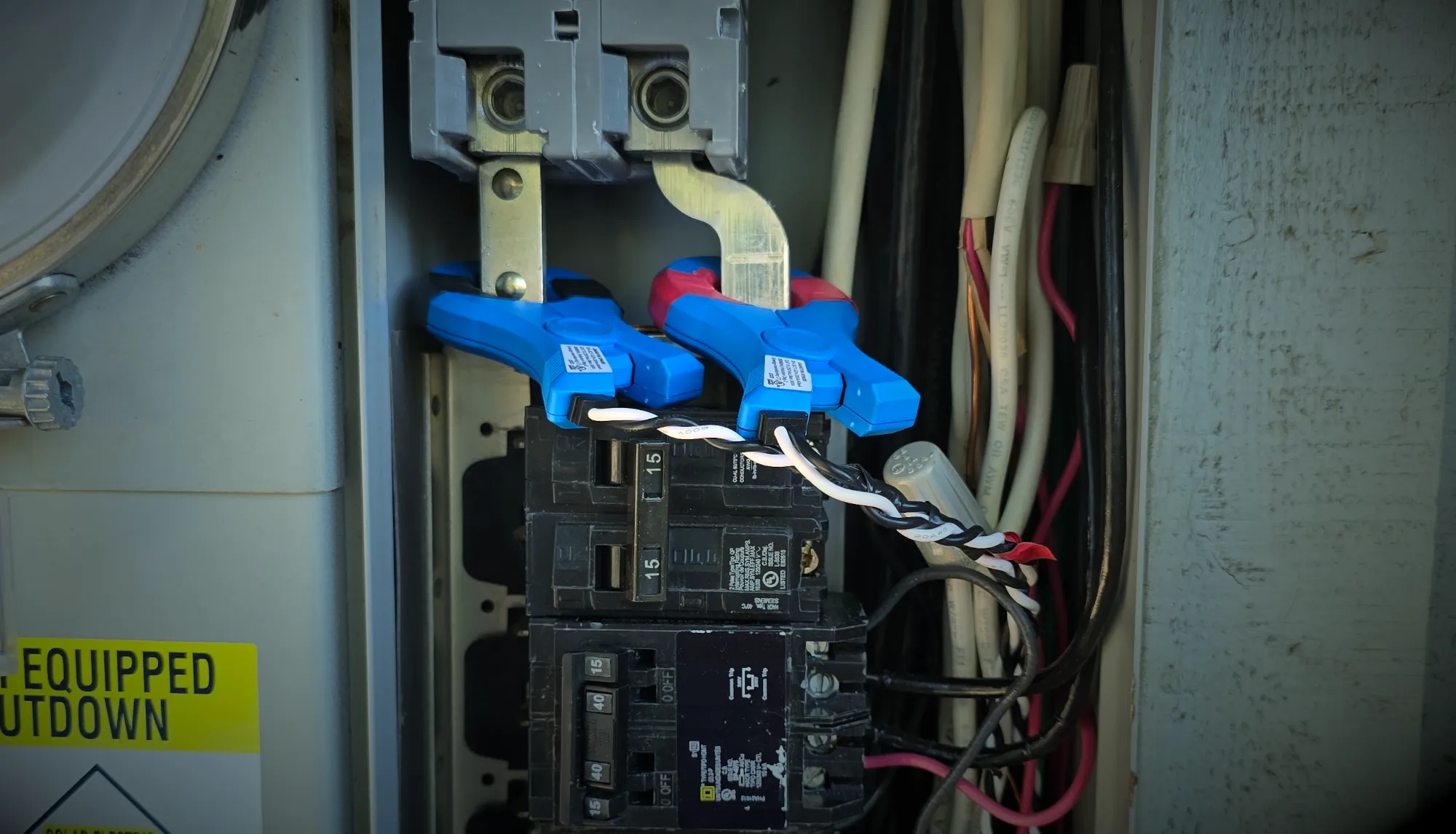
What Are Solar CTs and Why Do They Matter?
Current transformers, usually shortened to CTs, are small sensors that measure electrical current flowing through a conductor. In residential solar and battery systems, they are commonly used to tell the monitoring system how much power is being produced, consumed, imported from the grid, or exported back to the utility.
That information is what drives the power-flow screen you see in apps from Tesla, Enphase, SolarEdge, and other manufacturers.
The important part is that solar CTs have to be installed and configured correctly. A CT can be physically present and still provide bad information if it is backwards, installed on the wrong conductor, paired with the wrong voltage reference, or configured incorrectly in software.
For Sacramento-area homeowners with solar and battery storage, incorrect CT readings can make an otherwise functional system look like it has a major problem.
What Do CTs Measure in a Solar and Battery System?
Depending on the equipment and system design, CTs may monitor several different points.
- Solar production: How much power the solar inverter is producing.
- Site consumption: How much electricity the home is using.
- Grid import and export: Whether electricity is coming from PG&E or being sent back to the grid.
- Battery behavior: CT measurements may also be used by the battery controls to determine when the battery should charge or discharge.
Some systems measure these values directly. Others calculate certain values based on the measurements available. That means one incorrect CT measurement can sometimes make several values in the app appear wrong.
Common Symptoms of Incorrect Solar CT Readings
CT problems often show up as strange power-flow behavior rather than an obvious equipment fault.
Things worth paying attention to include:
- Solar production showing as negative during the day.
- The house appearing to consume an unrealistic amount of power.
- Grid import increasing when solar production increases.
- The battery charging or discharging when you would not expect it to.
- Solar production in the monitoring app being substantially different from the inverter’s own production reading.
- The app showing grid export at night when no solar production is possible.
- Power-flow arrows moving in directions that do not make sense.
Not every unusual reading is caused by a CT problem. Battery operating modes, delayed monitoring data, inverter limitations, household loads, and utility metering can all affect what you see. But consistently illogical power flow is a good reason to verify the metering.
Solar CT Verification Step 1: Start With a Basic Reality Check
You do not need to open an electrical panel to perform the first CT verification step.
Pick a clear period during the middle of the day when the solar system is producing steadily. Look at the power-flow screen and ask whether the numbers make sense together.
For example, suppose your solar system is showing 5 kW of production and the house is using approximately 1 kW. With no battery charging, you would generally expect the remaining power to be exported to the grid.
If the app instead shows the house importing several kilowatts from PG&E at the same time, something deserves a closer look.
Solar CT Verification Step 2: Compare Solar Production With the Inverter
If your inverter or manufacturer monitoring platform provides its own production measurement, compare it with the solar production shown by the battery or energy-management system.
The readings do not necessarily have to match perfectly. They may update at different intervals and can have small measurement differences.
They should, however, be reasonably close.
If an inverter reports approximately 6 kW of production while another monitoring system reports 2 kW, 10 kW, or a negative number, the CT configuration should be investigated.
Tesla specifically recommends comparing solar CT readings against the inverter, monitoring app, or an independent measurement when verifying Powerwall metering. Tesla also notes that solar measurements should be positive while the PV system is producing. You can review Tesla’s Powerwall CT installation and verification guidance here.
Solar CT Verification Step 3: Watch What Happens When Large Loads Turn On
Another useful homeowner-level test is to observe the monitoring system while a known electrical load changes.
An electric oven, air conditioner, electric water heater, EV charger, or similar large load can make the change easier to see.
If a large load turns on, home consumption should increase by a believable amount. Grid import may increase, solar export may decrease, or battery discharge may increase depending on how the system is operating.
If the opposite happens—for example, reported home consumption drops when a large load starts—that can point toward incorrect CT orientation, placement, or configuration.
CT Orientation Is Only Part of the Picture
A common assumption is that every CT problem is simply a clamp installed backwards. Sometimes it is. But that is not the only possible issue.
A CT also needs to measure the correct conductor and, in systems that use separate voltage references, the current measurement must correspond to the correct electrical phase.
This is especially important in a typical 120/240-volt residential electrical service.
If a CT is measuring current from Line 1 while the monitoring system is using the voltage reference from Line 2, the resulting power calculation can be wrong even though the CT itself is facing the correct direction.
Both Tesla and Enphase specifically instruct installers to match CT measurements with the corresponding voltage phase. Enphase also warns that conductor colors alone should not automatically be assumed to identify the correct phase.
Why CT Phasing Problems Can Produce Very Convincing Bad Data
Incorrect CT phasing can be particularly confusing because the monitoring system may still show numbers instead of generating an obvious error.
The system is essentially trying to calculate real power using a current waveform and a voltage waveform that do not belong together.
That can result in readings that are too high, too low, negative, or that change dramatically as loads and solar production change.
This is one reason I do not recommend diagnosing a solar or battery problem based solely on an app screenshot. The data first needs to be verified.
Can a Homeowner Physically Check Solar CTs?
For most homeowners, the answer should be no.
CTs are frequently located inside main electrical panels, backup gateways, meter equipment, solar combiners, or other enclosures containing energized conductors and busbars.
Opening those enclosures simply to see which direction a CT is facing is not worth the electrical hazard.
Manufacturer instructions from both Tesla and Enphase require circuits to be properly de-energized before installing or servicing CTs.
A homeowner can safely identify suspicious monitoring behavior. Physical CT verification should be performed by someone qualified to work inside the equipment.
What Should Be Checked During a Professional CT Inspection?
When I verify CT metering on a residential solar or battery system, I am looking at more than just whether the clamps are installed.
Depending on the equipment, verification may include:
- Confirming which conductor each CT is actually measuring.
- Verifying CT orientation.
- Confirming Line 1 and Line 2 phase relationships.
- Verifying the voltage reference used by the monitoring meter.
- Comparing CT amperage against an independent clamp meter.
- Comparing solar CT measurements with inverter output.
- Checking that all solar sources are being captured.
- Making sure household loads are not accidentally included in a solar-production CT.
- Checking for overlapping CT measurements.
- Reviewing software configuration and assigned CT functions.
The goal is to prove that the monitoring system is measuring the actual electrical system correctly—not simply that the app is displaying numbers.
Incorrect CT Data Can Affect More Than Monitoring
With a basic solar-only system, incorrect CT data may primarily affect what the homeowner sees in the monitoring portal.
With a battery system, the consequences can be more significant.
Battery controls may use site and solar measurements to determine whether excess solar is available, whether the home is importing from the grid, and when charging or discharging should occur.
Bad metering can therefore contribute to strange battery behavior, unexpected grid consumption, or confusing power-flow displays.
If your system consistently appears to be measuring production or consumption incorrectly, proper monitoring verification is an important part of diagnosing the problem.
Solar CT Problems in Sacramento Homes
Solar and battery systems throughout Sacramento, Roseville, Rocklin, Folsom, Elk Grove, and surrounding communities use a wide variety of monitoring configurations.
Some are straightforward solar-only installations. Others have been expanded over time with batteries, additional inverters, relocated electrical panels, backup gateways, or replacement monitoring equipment.
Any time the electrical configuration changes, CT placement and configuration should be reconsidered rather than assumed to still be correct.
If your monitoring data suddenly changed after a battery installation, inverter replacement, electrical-panel modification, or other service work, the CT configuration should be one of the items verified.
The Bottom Line
Solar CTs are the eyes of the monitoring system. If they measure the wrong conductor, face the wrong direction, or reference the wrong electrical phase, the software can only work with the bad information it receives.
Homeowners can perform several useful verification steps without touching electrical equipment: compare solar production, watch grid flow, observe known loads, and look for behavior that simply does not make electrical sense.
If those checks reveal a consistent discrepancy, the next step is not guessing at settings in the app. It is verifying the CTs, voltage references, configuration, and actual power flow with independent measurements.
Leave a Reply